This lab gives you some practice in thinking about how texts become data and how questions of literary genre change when you ask them about those data. More concretely, it will prepare you to write the second short paper, which asks you to respond in some detail to Underwood’s argument in his chapter on genre. The details of the statistical modeling techniques Underwood uses are beyond the scope of this class. Keep careful notes of what you try and do not hesitate to ask questions about how to do things. To keep notes, recall that you can and should record R statements in a .R file you keep open in RStudio and save at the end of your session. In addition to statements, you should remember to write comments: anything after a # is ignored by R. Comments are a good way to explain to yourself what you were doing with your code.
# find the # of elements in the letters vector
length(letters)
Make sure you have updated the dataculture package since Sunday with
remotes::install_github("agoldst/dataculture")You should restart R (use “Restart R” in the Session menu) after doing this.
(1) the sources: spend about 25 minutes
Begin with Underwood’s metadata for the texts studied in “The Life Spans of Genres,” chap. 2 of Distant Horizons. After
library(dataculture)Note to visitors in 2023 and after: since I updated my dataculture package, to run the code below you will also need to explicitly load the tidyverse:
library(tidyverse)you can access a copy of this metadata in the genre_meta data frame. We looked at this data on the web in the last class session. Just typing genre_meta will get you a little snippet of the top left of this table, but you can’t see everything. The names of all the columns of the table can be extracted with
colnames(genre_meta)You can pick out any number of columns with the select function:
genre_meta |> select(title, firstpub, tags)Use
selectto look at the tops of columns you didn’t look at carefully before. Pay special attention to which columns have data for every volume, and where data is missing. You can also tally up missing data withgenre_meta |> mutate(across(everything(), is.na)) |> summarize(across(everything(), sum))This code says, first, “replace every value by
TRUEif it’sNAandFALSEotherwise; then, take the sum ofTRUEvalues for each column. Why didn’t Underwood just use the Library of Congress subjects to pick examples of science fiction?The
tagscolumn is the heart of what Underwood is studying. KNOW THY DATA and read over Underwood’s documentation for this, which is found in his replication repository at chapter2/metadata/genrecategorieschapter2.docx. This is so important that I have copied it over so you won’t miss it. You can read it within RStudio by going throughhelp(genre_meta).- Take 5 minutes to talk with your group about the genre-tagging process. What exactly is Underwood studying when he studies combinations of labels?
Now get a little familiar with some of the volumes under investigation. A random sample of metadata for volumes matching a particular tag can be extracted with code like
genre_meta |> filter(str_detect(tags, "locscifi")) |>
    slice_sample(n=5)
If the volume has an oclc number, it came from the HathiTrust database of scanned university library books. These books can be examined online using their recordid (not the oclc number which is used in a different database) by going to a URL in the web browser that looks like
https://catalog.hathitrust.org/Record/RECORDID(replace RECORDID with the number).
The following code will take you to an arbitrary volume from Underwood’s set. Try it:
genre_meta |> filter(!is.na(oclc)) |>
    slice_sample(n=1) |>
    transmute(url=str_c("https://catalog.hathitrust.org/Record/", recordid)) |>
    pull(url) |>
    browseURL()
Click a “Full View” link from the catalog page. See how long it takes you to decide whether you would call the volume science fiction, detective fiction, Gothic fiction, or none of the above.
Whenever Underwood talks about “modeling science fiction” or “modeling detective fiction,” he is discussing a model that attempts to distinguish science fiction (etc.) volumes from an equal number tagged
randomandchirandom. Make sure you look at arandomvolume on HathiTrust too.
This metadata is itself quite rich, including information not used for Underwood’s analysis in the chapter you read. The nationality and gender columns are interesting data to have. You can tally gender totals in Underwood’s science fiction selection with
genre_meta |>
    filter(str_detect(tags, "scifi")) |>
    count(gender)
str_detect is a string-matching function. str_detect(tags, "scifi") is a logical vector whose elements are TRUE if the corresponding element of tags matches (contains) scifi. A typical tags element looks like chiscifi | teamred, which contains the character sequence scifi.1
You might learn more by looking at those author-gender counts for each of the different science-fiction tags and the
randomtags.Compute these counts (simply change
"scifi"in the snippet above). There’s one tag that is very different from the others. Why would this matter for Underwood’s argument?Try the same tally for
det100(one of the detective tags). What’s funny?
(2) text as data: spend about 25 minutes
Now look at the representations of these books which Underwood does his computations with. I’ve copied an example file for you to look at like this:
ex_text <- read_tsv("https://dc22.andrewgoldstone.com/2022/11/14/lab8/mdp.39015049217741.tsv",
    col_names=c("feature", "weight"))
Look at some of the rows of
ex_text. Useex_text |> arrange(desc(weight))to look at the most frequent “features” of the text. Can you get some idea of what kind of book it is from the list of frequent features? How far down the list do you have to go? Trick question: How far down the list do you have to go to figure out what the story is?The file name at the end of the URL above corresponds to the
docid(with.tsvadded), so you should be able to usefilterto find its metadata row ingenre_metaWhat volume is it?The trick question in (1) is actually a serious one. Look at the first few pages of the scans of the corresponding volume on HathiTrust (remember, use the
recordidto form the URL). Spend 5 minutes brainstorming with your group about the differences and the similarities between reading a book like this and trying to classify it algorithmically using data likeex_text.
ex_text includes 12197 features. It does not cover every word in the (OCR-derived) text, and it adds some features that are not single-word frequencies (these are labeled with a # at the start). Underwood does quite a bit of “preprocessing” in order to produce a useful starting set of features.2
And even with that, he ends up pruning the set of features used for statistical modeling.
I have provided the data Underwood actually works with in a variable named genre_features. A minor incantation is needed here before we work with it:
library(Matrix)Now enter
genre_featuresConfusing! you can sort of see that this is another spreadsheet-type variable, in which each row corresponds to one of the documents represented in genre_meta, and each column gives the values of one of the 4889 features (word frequencies, etc.) Underwood uses in his study.
For performance reasons, genre_features is not a data frame but a different kind of object, a matrix, so we can’t use it with data-frame functions like filter and select directly.3
Instead, we use a slightly different syntax: Here is how to access the frequency of the word “detective” in a document with docid mdp.39015049217741:
genre_features["mdp.39015049217741", "detective"]The number returned here is in engineer’s scientific notation (e-05 means \(\times 10^{-5}\), that is, move the decimal point five places to the left). It’s a small number, corresponding to 7 occurrences in the text. If you try to access a word that isn’t on the list of features, you will get an error like invalid character indexing. The full list of features is obtainable with colnames(genre_features) (alphabetize this with |> sort()) and you can check the list as follows:
"detective" %in% colnames(genre_features)
"holmes" %in% colnames(genre_features)
With these pieces in place, you can start to explore how much single words tell you about genres on their own.
- In your group, brainstorm some single words that you think might be interesting indicators of science fiction. Then talk about how you would make and assess a single-word “model” using Underwood’s data. (Try not to scroll down to the next step until after your discussion.)
Here is a visual approach. The following lines first create a “balanced” set in which the number of SF and “random” non-SF volumes is equal:4
# compute number of SF volumes
n_sf <- genre_meta |>
    filter(str_detect(tags, "scifi")) |>
    nrow()
sf_set <- genre_meta |>
    select(docid, author, title, firstpub, tags) |>
    mutate(sf=str_detect(tags, "scifi"),
           random=str_detect(tags, "random") & !sf) |>
    filter(sf | random) |>
    group_by(sf) |>
    # randomly choose n_sf random volumes
    # (and n_sf SF volumes, but that's all of them)
    slice_sample(n=n_sf) |>
    ungroup()
In words, this selects a few columns from genre_meta, creates new columns sf and random indicating whether the volume is or is not SF and or is not in the non-SF “random” volumes, and finally chooses n_sf of the random volumes. Now let’s study the frequency of the word “space” as an indicator of genre. Try:
space_test <- sf_set |>
    mutate(space=genre_features[docid, "space"])

ggplot(space_test) +
    # alpha is transparency: 0.4 means 40% opaque
geom_point(aes(x=space, y=sf), alpha=0.4, position="jitter")(geom_violin is an interesting alternative here.) If we were to just eyeball this and hope for the best, maybe we’d try a discrimination rule like: if space is more than 0.0001, guess it’s science fiction. How well would we do?
space_test |>
    mutate(test=(space > 0.0001) == sf) |>
    ggplot(aes(x=sf, fill=test)) +
        geom_bar(position="fill")
This creates a new column, test, which is TRUE if our test space > 0.0001 is correct and FALSE otherwise, and the bar chart shows you the proportions of right guesses in each category. (To see the total accuracy, replace x=sf with x=1. To compute it, replace the ggplot with summarize(accuracy=mean(test)).)
We can even create a “probability” score like the one used as the y axis in Underwood’s charts. The more frequent space is in a text, the more I would want to bet on the text being science fiction. We can assign a score between 0 and 1 with the formula
\[ \frac{1}{1 + e^{-(-1 + 10000 \cdot \textrm{space} })} \]
whose graph is
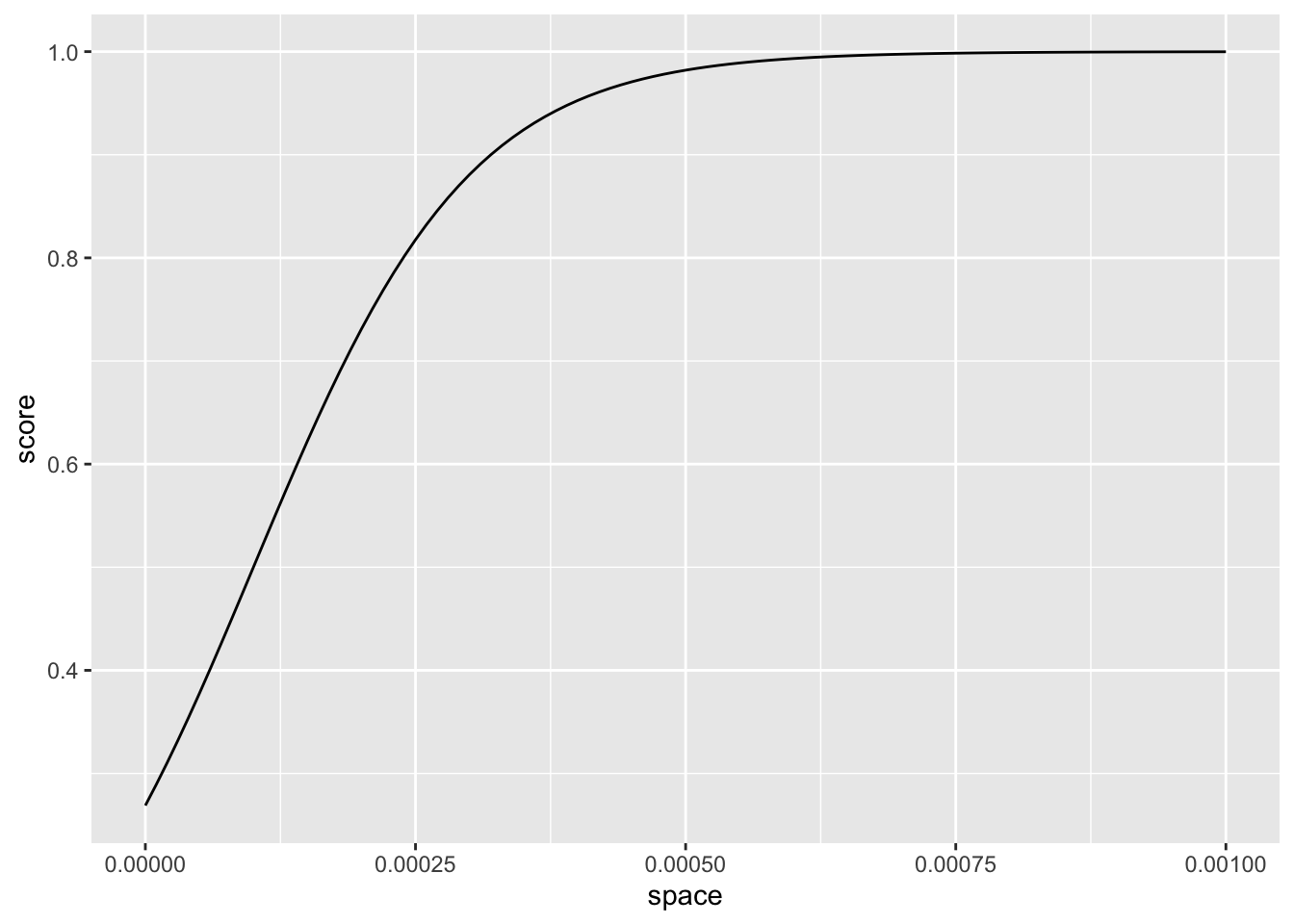
and if a text’s score comes out above 0.5, I will bet on science fiction. The following chart shows, like one of Underwood’s, how the “model” scores against the genre labels, with publication date on the x axis in case we see a time trend.
space_scores <- space_test |>
    mutate(score=1 / (1 + exp(1 - space * 10000)))

ggplot(space_scores, aes(firstpub, score, color=sf)) +
        geom_point() +
        # draw the decision boundary
        geom_hline(yintercept=0.5,
                   linetype="dashed") +
        scale_y_continuous(limits=c(0, 1))
We don’t have any scores below 0.25 here because we only have the one non-negative predictor.5
Try the experiments above with your own indicator word, and see who at your table can produce the most accurate one-word model of science fiction.
- But so what? Spend five minutes talking over what your “models” tell you about the nature of the genre category, given the classification accuracy you have achieved.
(3) model outputs: spend about 10 minutes
Finally, let us explore some of the information Underwood provides about his model outputs. You can see the scores his model assigns to the texts in his data set here:
tu_sf <- read_csv("https://raw.githubusercontent.com/tedunderwood/horizon/master/chapter2/modeloutput/allSF.csv") |>
    select(docid=volid, firstpub, logistic, realclass, genretags)
The logistic column of tu_sf contains the model estimate of the “probability” that a text with the given features is science fiction. The realclass column is 1 if it had one of the scifi genre tags, 0 otherwise.
- As a review from the last class, reproduce Underwood’s figure 2.2 using this data.
You can also read more information about the model that produced these scores with
tu_sf_coef <- read_csv("https://raw.githubusercontent.com/tedunderwood/horizon/master/chapter2/modeloutput/allSF.coefs.csv",
    col_names=c("feature", "beta", "b"))
These are the multipliers that are used to produce the sum \(\sum_i b_i x_i\) in the estimated probability
\[ P(y=1|x_i) = \frac{1}{1 + \exp\left(-\left(b_0 + \sum_i b_i x_i\right)\right)} \]
beta and b contain the same information in different units (this has to do with the technicalities of how the model is fit).
Underwood sometimes comments on the “highly weighted” features of the model: this corresponds to the rows of the table with
betavery large and positive or very large and negative. As the formula indicates, these are the features that make an especially large contribution to the predicted probability value. Look at these (useslice_max(beta, n=10)andslice_minsimilarly) and discuss whether they teach you anything about the genre of science fiction.Compare the detective-fiction features, which you can read in with
tu_det_coef <- read_csv("https://raw.githubusercontent.com/tedunderwood/horizon/master/chapter2/modeloutput/detectnewgatesensation.coefs.csv",
    col_names=c("feature", "beta", "b"))
If you have made it to the end here, good work—now you are prepared to reflect in more detail on the relation between data and argument in Underwood’s chapter for your second paper.
For experienced programmers: the pattern can be any regular expression. Due to R’s string-escaping rules, complex regular expressions should be quoted using the special raw-string syntax
r'(...)'. See the “vignette” on regular expressions at cran.r-project.org/web/packages/stringr/vignettes/regular-expressions.html.↩︎The process is documented via the Python script Underwood actually used, tokenizetexts.py. Among other things, British and American spellings are combined, most personal and place names are combined, numbers are folded into a single category, etc.↩︎
Technically, a sparse Matrix object, of class dgCMatrix. The features here combine those used in all of the models discussed by Underwood, so it is slightly larger superset of the feature sets used for modeling individual genres. A fun thing about text data is that even very modestly sized datasets quickly become Big Data that won’t fit on your computer unless your programs have good techniques for squishing them into memory. The reason is the same as the reason most baby names are very rare.↩︎
Because of this further random sampling of the “random” volumes, each person who runs this code will have a slightly different “training set” of non-SF volumes. This is good! The goal is a model that can distinguish SF not just from any particular sample of non-SF fiction, but from any sample. In a complete analysis, you would want to resample many times and see how much your results change.↩︎
It’s interesting to look at the “worst” failures of a relatively good classifier. In one of my runs, the space-iest “random” novel was a very literary alternate-universe novel by Vladimir Nabokov. You can find our own “worst” case with something like:
↩︎space_scores |> filter(!sf) |> slice_max(score) |> select(author, title)